Creative Workflow Automation: A Practical Guide for Creators
Learn what creative workflow automation covers, how to build one in 90 days, and how to keep quality high across video, music, image and social content.
Creative workflow automation means handing the repeatable parts of making content (drafting, resizing, dubbing, clipping, scheduling, routing for review) to software, so your time goes to ideas and decisions. The fastest way to get there is one platform that covers video, music, images and voice, so assets and settings carry from step to step instead of being rebuilt in five tools. That is the approach behind AiEnvoy’s creative studio, and the rest of this guide shows how to build the workflow yourself, step by step.
TL;DR
- Creative workflow automation removes repetitive handoffs and production steps. It does not replace taste, strategy or final approval.
- Start by mapping your real pipeline and measuring it. Then standardize templates and briefs. Automate last.
- Build quality checks into every stage rather than inspecting only at the end.
- Fewer tools means fewer handoffs. One studio for video, music, images, dubbing and scheduling keeps assets, characters and styles consistent.
- A free tier lets you automate one real task this week and judge the time saved on your own numbers.
Table of Contents
- What creative workflow automation actually is
- What you can automate across the pipeline
- A real example: automation as a loop, not a one-off
- How to build a creative workflow automation, step by step
- Keeping quality and human judgment in an automated workflow
- What to look for in creative automation software
- Three workflows you can copy
- Where AiEnvoy fits
- Our perspective
- FAQ
- Sources
What creative workflow automation actually is
A creative workflow is the path a piece of content takes from idea to published asset: brief, concept, production, review, revisions, delivery, publishing. Workflow automation in general moves data and tasks between steps without a person doing the copy and paste. Creative workflow automation applies the same idea to work where the output is a video, a track, an image or a script, and where the production step itself can now be done by AI.
That last point is what separates it from classic project-management automation. A generic tool can notify a reviewer or move a card to “Approved.” A creative automation setup can also generate the first cut, create twelve variations of an image, dub a video into another language or turn a long recording into short clips. Both layers matter: the coordination layer (who does what, when) and the production layer (making the asset).
People search this topic under several names: creative automation software, creative workflow automation tools, creative ops. They all describe the same goal: more finished, on-brand content from the same hours.
What you can automate across the pipeline
Think in stages, because each stage has different automation payoff.
| Stage | Typical repetitive work | What automation does |
|---|---|---|
| Planning and scripting | Drafting hooks, outlines, captions, variations | AI writing tools produce first drafts from a brief |
| Production | Filming alternatives, editing, scoring, voiceover | Text-to-video or image-to-video generation, AI music, AI voices |
| Adaptation | Cutting long videos into shorts, resizing, translating | Automated clipping, dubbing, style transformations |
| Review and approval | Chasing feedback, version tracking | Routing, reminders, checklists, automated checks |
| Publishing | Scheduling, posting across channels | Scheduled pipelines that run on a calendar |
The highest payoff usually sits in adaptation and publishing. Making one hero asset is a creative act. Turning it into twenty channel-ready versions is a mechanical one, and that is where hours disappear.
Video
A marketer with one product story needs a long cut, a vertical short, a square version and a subtitled or dubbed version for another market. Generating the base video from text or an image, then clipping and dubbing it, replaces what used to be separate editing, translation and recording jobs. In AiEnvoy, the AI Video Generator creates cinematic video with models such as Sora, Kling and Veo, and the AI Video Clipper turns long videos into shorts. AI Video Dubbing handles multi-language versions with natural AI voices.
Music and audio
Musicians and video makers lose time hunting for tracks, licensing them and fitting them to a cut. Generating a track with lyrics and vocals, or creating sound effects to match a scene, keeps audio inside the same pipeline. Our guide to creating sound effects with AI shows how that fits a video workflow, and the AI Music Generator covers songs and tracks.
Images and characters
Image-to-image transformations let you restyle one visual into many artistic looks. Reusable character profiles solve a different problem: consistency. If the same character or mascot must appear across a dozen clips, saving it once and reusing it beats re-describing it in every prompt.
Social media
Social managers face the most relentless calendar. The work is not one great post but a steady stream of acceptable-to-excellent ones. Our write-up on social media content automation lays out a workflow that keeps quality as volume goes up.
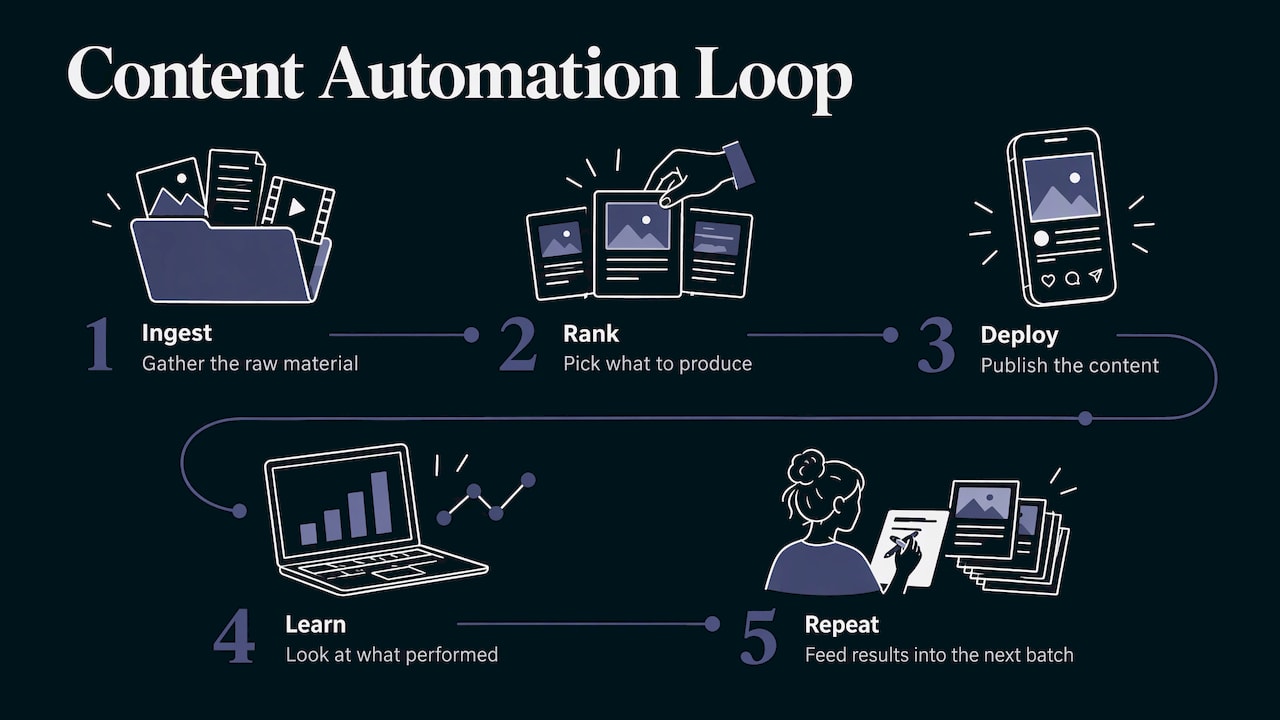
A real example: automation as a loop, not a one-off
The most useful mental model is a loop. Spotify’s engineering team has described an automated content-marketing system built on five stages: ingest, rank, deploy, learn and repeat. In a three-week A/B test across two regions, its machine-learning model delivered 4% and 14% cheaper cost per registration than the heuristic approach, driven by 11 to 12% higher click-through rates on ads generated from predicted content rankings.
You do not need Spotify’s scale to borrow the structure. A solo creator can do a small version: gather the raw material, pick what to produce, publish, look at what performed, and feed that back into the next batch. Automation matters most at the “deploy” and “repeat” steps, because those are the ones people skip when they get busy.
How to build a creative workflow automation, step by step
A 90-day rollout described in a creative-ops guide from adsales.pro gives a sensible spine: map and measure in the first month, standardize in the second, automate in the third. Here is that sequence adapted for a creator or a small marketing team.
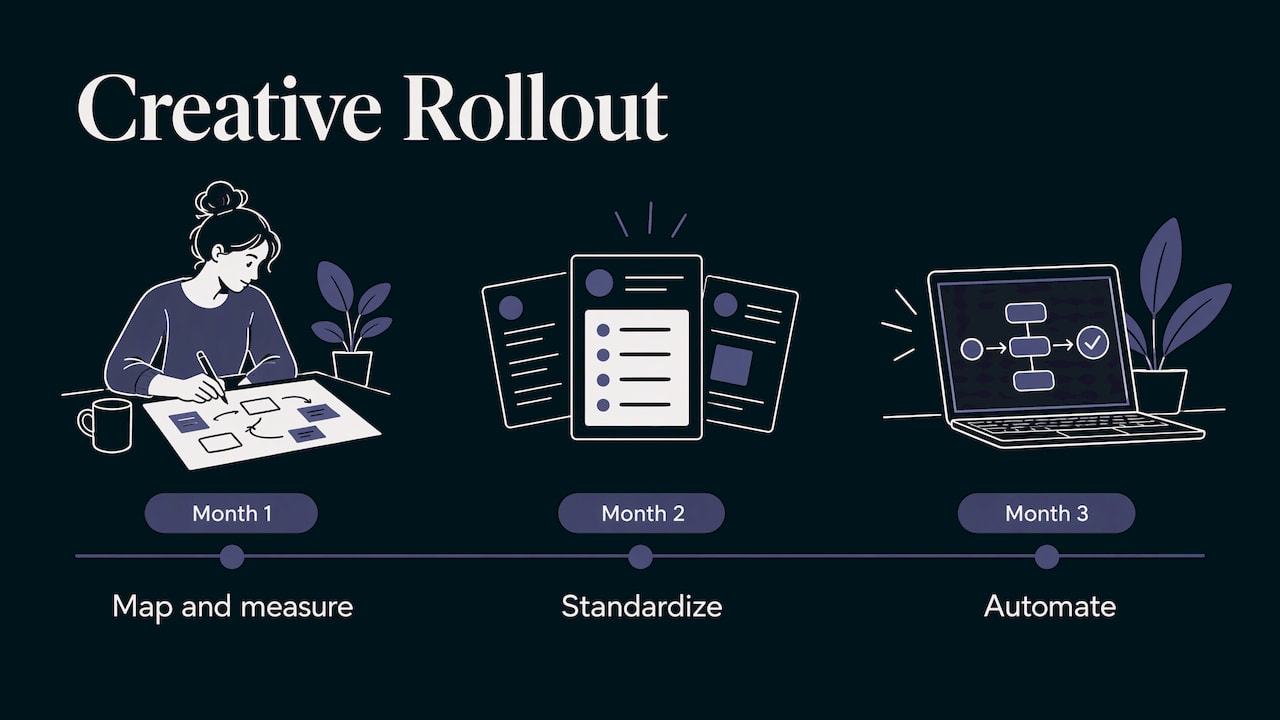
1. Map the pipeline you actually have
Write down every step a typical piece of content goes through, including the awkward ones: the Slack message asking for a logo, the export that always needs redoing, the caption written at 11 p.m. Then record baselines for each deliverable type: cycle time from brief to publish, number of revision rounds, how often the first draft gets approved, and how often a defect slips through.
Where it goes wrong: teams map the process they wish they had. Map what happened on the last five projects.
2. Pick the first task by repetition, not by excitement
Look for work that is frequent, rule-based and low-stakes: resizing, subtitling, dubbing, clipping, drafting caption variants, scheduling. Skip the task that needs your sharpest judgment. One clean win builds trust in the system.
3. Standardize before you automate
Automating a messy process gives you messy output faster. Define a brief template (goal, audience, format, tone, length, call to action), the naming convention for files, and the checklist a finished asset must pass. Reusable templates and saved characters or styles do the standardizing for you. In AiEnvoy, the Templates Library and reusable AI character profiles exist for this, so a brand look is set once and reused.
4. Connect the steps
The point is to remove the manual handoff: the generated video flows into the clipper, the clips flow into dubbing, the finished versions flow into a schedule. Doing this inside one studio keeps the assets together. Our piece on creative asset management explains why organized, findable assets decide whether automation saves time or just creates a bigger pile of files.
For recurring content, AutoPilot is built for automated AI content creation and scheduling, so a pipeline can run on a calendar instead of on your attention.
5. Build checks into every stage
This is the step most people under-invest in, and it gets its own section below.
6. Measure, then review monthly
Compare against your step 1 baselines. If cycle time dropped but revisions rose, the speed is being paid for in quality, and your templates or checks need work. A monthly review is enough: look at what shipped, what got sent back and why, and adjust one thing.
Keeping quality and human judgment in an automated workflow
Automated does not mean unattended. The pattern that holds up is progressive quality control: validate at intake, at production, before delivery and before launch, instead of treating review as one final inspection. The adsales.pro guide makes the same argument, noting that problems caught earlier are cheaper to fix and that late-stage inspection is what stretches production cycles.
A practical three-level model for AI-assisted content:
- Automated checks, no human. Required fields filled, correct dimensions and length, banned phrases absent, brand colors and logos present.
- Sampled human review. A person looks at a regular sample, for instance every fifth piece, or everything above a risk threshold you set.
- Full human sign-off for anything with claims, pricing, legal wording or a public figure’s name attached.
For each AI-generated type, the reviewer’s eye is different:
- Text: facts, tone, and that nothing promises what you cannot deliver.
- Images and video: visual artifacts such as odd hands or flickering objects, brand fit, and whether a character looks the same from clip to clip.
- Audio: clipping, narration competing with the soundtrack, and whether a dubbed voice matches the pacing of the picture.
Track four numbers: first-pass approval rate, edit time per asset, defects that reach the audience, and how many assets a reviewer clears per hour. When first-pass approval climbs, your templates are working.
What to look for in creative automation software
With dozens of tools around, evaluate on the things that change your weekly hours:
- Coverage of your real formats. If you make video, music and social posts, a tool that only handles one forces you to stitch the rest by hand, and every stitch is a manual handoff.
- Consistency features. Saved characters, styles and templates so the tenth asset looks like the first.
- Adaptation built in. Clipping, dubbing and restyling are where volume comes from.
- Scheduling and pipelines. A tool that can run a repeatable sequence without you present.
- Asset organization. Generated media must be easy to find, reuse and hand off.
- Access for growth. If you later want to plug generation into your own product or pipeline, an API matters. AiEnvoy offers a Text-to-Video API, an Image-to-Video API, a Dubbing API and a Translation API, and the AI Short Stories API generates story videos.
- Learning curve. If setup takes a week, you will not keep using it.
An all-in-one studio wins on the first and third points almost by definition: one login, one asset library, one style carried across formats.
Three workflows you can copy
The weekly social batch. Write a one-page brief for the week. Draft captions and hooks with AI writing tools, generate a few short videos from text or images, restyle a few visuals, then queue everything on a schedule. Review a sample, sign off on anything with a claim, publish. Your baseline question: how many hours did a week of content take before?
The long-to-short repurpose. Take one long video such as a webinar, interview or tutorial. Clip it into shorts, add captions, dub the best ones into the languages your audience speaks. One recording becomes a month of posts.
The release kit for a musician. Generate or refine the track with lyrics and vocals, create a looping cinematic visual for it, cut vertical teasers, and add sound design to the teaser clips. Keep the same character or visual identity across all of them so the release feels like one campaign.
Where AiEnvoy fits
AiEnvoy is an AI creative studio that puts video, music, images, voice, dubbing, writing tools, AutoPilot pipelines, AI characters and a templates library in one place. Instead of exporting from one app and importing into the next, you generate, adapt and schedule in the same environment. There is a Free plan at $0 per month to run your first automation on a real task, plus Premium and Token Packs on the pricing page when your volume grows.
A good first test: pick one repeated task from your step 1 map, such as turning a long video into shorts, and run it through the studio. Compare the hours against your baseline. You can see every tool on the features page.
Our perspective
We built AiEnvoy on a simple observation: most creative time is not lost in the creative moment, it is lost between tools. A video made in one app, a soundtrack in another, a dub in a third, a schedule in a fourth. Every handoff is a place where files get lost, styles drift and momentum dies.
That is why we put cinematic video models such as Sora, Kling and Veo, music, images, voice, dubbing and writing in a single studio, and why we added reusable AI characters, templates and AutoPilot. Automation should protect your taste, not dilute it. Set your look once, and every asset that follows can inherit it.
Our advice to any creator or marketer: do not start by automating everything. Start with the one task you dread repeating, standardize it, and let the studio carry it. The hours you get back are the ones that make the work better.
the AiEnvoy team
FAQ
Can ChatGPT create workflows?
A general chat assistant can draft a plan, a brief template or a checklist for your workflow. It does not produce your video, music and scheduled posts inside one pipeline. For that you need a creative studio where generation, adaptation and publishing connect, such as AiEnvoy’s tools and AutoPilot.
What are examples of creative workflow automation?
Common examples are turning one long video into several short clips, dubbing a video into multiple languages, generating image variations in different styles, drafting caption variants from one brief and scheduling a week of posts in one go. Marketing teams also automate the loop of publishing, measuring and reusing what performed, as in the Spotify example above.
How long does it take to set up a creative workflow automation?
A realistic plan is about 90 days for a team: map and measure the first month, standardize templates and checklists the second, then automate handoffs and review monthly. A solo creator can automate a single task in a day and expand from there.
Does automation hurt creative quality?
Not when checks are built in. Use automated checks for rules, sampled human review for routine pieces and full sign-off for anything with claims or legal wording. Reusable characters and templates also make output more consistent from asset to asset.
Sources
- How We Automated Content Marketing to Acquire Users at Scale (Spotify Engineering)
- Creative Ops at Scale: Faster Production, Better Quality (adsales.pro)
Recommended
Put this workflow into practice with AiEnvoy
Create videos, AI music, and multi-language dubbing with Sora, Kling, Veo, and Seedance 2.5 — or connect our Developer APIs.