How to Add Vocals to Music: Record, Align and Mix
Learn how to add vocals to music, from setting up your session and recording to timing, mixing and AI vocals, so the voice sits inside the track.
Adding vocals to music comes down to three jobs: get a clean vocal recorded or generated against the track, line it up in time and pitch, then carve space for it so it sounds like part of the song. You can do all three in a recording program with your own voice, or start from the AI route: our AI Music Generator lets you write or generate lyrics and add vocals to a track inside the same studio you use for video and images.
This guide covers both routes for creators, musicians and marketers who need a finished song fast.
TL;DR
- Set up a session that matches the track’s tempo, give yourself a one-bar count-in, and record on a dedicated vocal track.
- Record several takes and combine the best phrases, then fix timing and pitch lightly.
- To make a vocal sit in the track, clean it, compress it lightly, add a little delay and reverb, and make room in the instrumental.
- If you do not sing, AI vocals and lyrics can be generated over an instrumental in one workflow.
- Extracting an acapella is a different job from adding vocals: it pulls a voice out of an existing song.
Table of Contents
- Two ways to add vocals
- Step 1: Set up the session
- Step 2: Record clean takes
- Step 3: Line the vocal up with the music
- Step 4: Fix pitch without flattening the performance
- Step 5: Mix the vocal so it sits in the track
- Adding AI vocals to an instrumental
- Adding vocals versus extracting an acapella
- Perspective
- Make your next track with vocals
- FAQ
- Sources
Two ways to add vocals
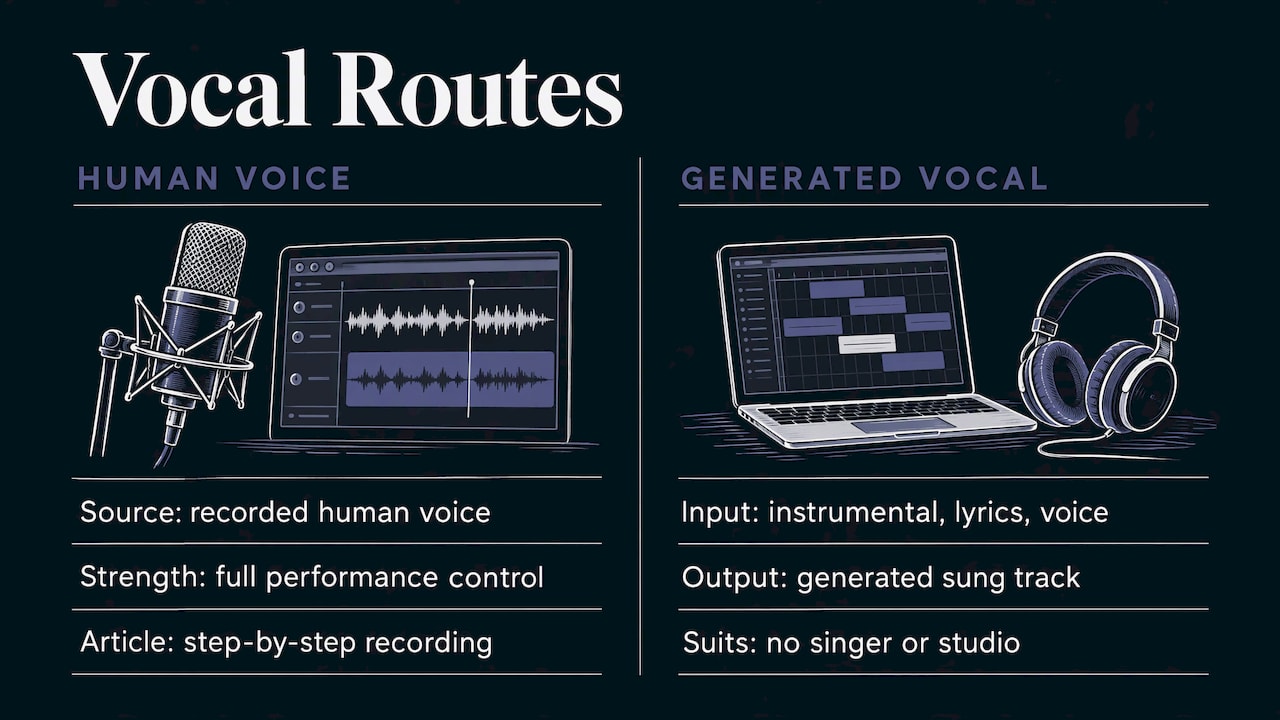
The first route is recording a human voice. It gives you full control over performance, and it is the route most of this article walks through step by step.
The second route is generating a vocal. You supply an instrumental, write lyrics (or have them written), pick a voice, and the tool produces a sung track. This suits creators who need music for videos, ads or social posts and do not have a singer or a studio. We cover it in its own section below.
The mixing principles apply to both. A vocal that is dropped on top of a finished instrumental will sound separate, whether a person or a model produced it.
Step 1: Set up the session
Start with an empty project in your recording software (a DAW, short for digital audio workstation). One producer guide recommends this order:
- Set the project tempo (BPM) to match the beat.
- Import the beat’s WAV file onto its own track.
- Place the first downbeat on bar 1 or bar 2, so you get a one-bar count-in.
- Turn the metronome off, since the drums already act as the click.
- Add an empty track for the vocal.
If you do not know the tempo, most DAWs can detect it, and a track exported from a generator usually states it. Matching the project tempo matters later, because every timing edit and delay effect depends on it.
If you built the instrumental in our studio, the music production workflow guide shows how the stages fit together from idea to release.
Step 2: Record clean takes
A few habits make everything afterward easier:
- Use headphones so the beat does not bleed into the microphone.
- Set the input gain so your loudest line does not clip. Quiet and clean beats loud and distorted, because level can be raised later but distortion cannot be removed.
- Record the same part several times. Engineer Paul White describes recording a vocal part repeatedly and compiling the best phrases into one final take, a process called comping.
- Cut carefully. In the same masterclass, edits are made between phrases, or just before a hard consonant, or during a sustained sound with a short crossfade, so the join cannot be heard.
Work in sections: verse, then chorus, then bridge. A tired voice at the end of a long session rarely beats a fresh take recorded the next day.
Step 3: Line the vocal up with the music
Even good singers drift off the grid. Timing correction has three tools: snapping to the beat grid, snapping to a groove, or nudging by hand. In a Cubase timing tutorial, the advice is to target the starts and ends of words, work on short sections of a copy, and keep the settings gentle.
The same article offers a warning worth remembering: quantising is easy to overdo. The aim is to reinforce the groove, and what looks right on the grid does not always sound best, so trust your ears over your eyes.
A vocal production guide from February 2026 gives practical numbers:
| Edit | Typical range |
|---|---|
| Fades at cuts after stripping silence | 3 to 10 ms |
| Breath reduction | 3 to 8 dB (10 to 15 dB for very breathy singers) |
| Nudging phrases to land consonants with the drums | 10 to 40 ms |
It also suggests keeping verses looser and choruses tighter. If a timing stretch makes the voice sound lispy or phasey, undo it and move the phrase instead of stretching it.
Step 4: Fix pitch without flattening the performance
Pitch correction should be the lightest touch in the chain. Paul White notes that for serious problems, a note-by-note editor such as Melodyne lets you adjust individual notes graphically, while smaller issues can be handled by shifting single words by a few cents (a cent is one hundredth of a semitone).
Fix only what a listener would notice. A slightly imperfect note that carries emotion is better than a perfect one that sounds robotic.
Step 5: Mix the vocal so it sits in the track
This is where most home projects fall short. Producer Jacob Waxman’s chain, described in Magnetic Magazine, runs like this:
- Clean and edit the raw vocal.
- Correct pitch, timing and dynamics.
- High-pass filter below 100 Hz to remove rumble.
- Add light compression, then saturation.
- Add light delay and reverb on separate aux buses (shared effect channels), which can themselves be EQ’d, compressed and side-chained.
He also suggests scaling back the low mids and bringing the vocal’s overall level up.
Make room in the instrumental
Audio engineer Streaky, in MusicRadar, frames the core problem as integration: carve space in the backing track so the vocal sounds glued in rather than stuck on, otherwise it gets buried. Vocals over a heavily compressed beat can sound like an appendage.
In practice, that means finding the frequencies where the instrumental competes with the voice (often the midrange) and gently turning down the competing instruments. Waxman adds that when a nearly finished track has room for a vocal, you should decide which lead elements to remove or scale back to fit it.
If the instrumental is already mastered
When you only have a stereo file, you cannot shape individual instruments. A Whipped Cream Sounds tutorial advises setting the vocal level slightly below your final target, so that after compression and EQ it lands where you want. Where you can, ask for stems (the separate instrument groups) instead.
Backing vocals
For harmonies, Modern Mixing suggests grouping them on one bus with generous compression to fuse them into a single chord, cleaning up the lower-mid build-up, and pushing them behind the lead with conservative reverb and a small cut between 1 and 5 kHz.
Adding AI vocals to an instrumental
If you do not sing, or you need a track for a video within the hour, a generated vocal is the faster path. The workflow is short: upload or create an instrumental, write lyrics or have them generated, choose a voice, and render.
In AiEnvoy, the AI Music Generator covers professional-quality music and songs with AI lyric generation and vocal recording, and sits beside the video, image and dubbing tools. That means the song you build can go straight into a clip you make with the AI Video Generator, without exporting between separate apps.
Tips for better generated vocals:
- Write lyrics that fit the rhythm. Short lines with clear stresses sit more naturally on a beat.
- Match the voice to the genre before you worry about anything else.
- Run the same mix steps. A light high-pass, gentle compression and a touch of reverb help a generated vocal blend with the instrumental just as they do a recorded one.
- Check distribution rules for your platform before releasing. The Vocal Market reports that distributors have updated their AI-content policies, so read the current terms of the service you plan to publish on.
If your track needs a longer arrangement before the vocal goes on, see our guide to extending AI music without breaking it.
Adding vocals versus extracting an acapella
These two jobs get confused. Adding vocals means putting a new voice on an instrumental. Extracting an acapella means separating the existing voice from a finished song, so you can reuse or remix it. Searches for the second task lead to separation tools, and the result depends on the original recording and on the rights to the song. For a project where you want a vocal you can use freely, starting from your own instrumental and a vocal you recorded or generated avoids the question.
Perspective
Most vocal problems we hear about come down to one thing: the voice and the music were made as separate objects. A vocal that is added at the end has to fight for space, so the best fix is to treat the voice as part of the arrangement from the start.
That is why we built music, lyrics and vocals into the same studio as video, images and dubbing. When the instrumental, the words and the sung line are created together, the timing and the mood already match, and you spend your time on taste instead of repair. For a social media manager or a marketer, that is the difference between a song that ships today and one that waits on a session next week.
Human performance still brings things nothing else does, and many of our users record their own voice. Our aim is to give every creator a way to add vocals that fits their schedule and skill level, in a single place.
the author
Make your next track with vocals
Our AI Music Generator creates songs with AI lyrics and vocals, and the same account gives you video generation, dubbing and image tools. You can start on the Free plan and look at the other options on the pricing page.

If you want to turn the finished song into video content in several languages, the AI dubbing tool handles multi-language voice-overs with natural AI voices.
FAQ
Can I add vocals to an instrumental I did not make?
Yes, as long as you have the right to use it. Import the file into your DAW, match the project tempo, and record on a separate track. A mastered stereo file limits how much you can shape the instrumental, so set the vocal level slightly below your target and mix gently.
Why does my vocal sound pasted on top?
Usually the voice and the instrumental occupy the same frequencies and have no shared space or effects. Make room by turning down competing midrange in the backing track, and add a little delay or reverb to the vocal so it seems to be in the same room.
How many takes should I record?
Record several passes of each section, then compile the best phrases into one take. Cut between phrases or before hard consonants so the edits stay inaudible.
Can AI write lyrics and sing them over my track?
Yes. Our AI Music Generator offers AI lyric generation and vocal recording, so you can supply an instrumental or create one, add lyrics, and choose a voice in the same tool.
Sources
- How to Record Vocals Over a Beat: Phone to DAW
- Vocal Recording & Production Masterclass
- Cubase: Vocal Timing Correction
- How to Vocal Production Like a Professional Producer
- Jacob Waxman’s Guide To Ambient Vocal Production
- How the pros mix vocals
- Mixing Vocals on an Already Mastered Instrumental
- 5 Tips for Mixing Background Vocals
- AI Vocals vs Human Vocals
Recommended
Put this workflow into practice with AiEnvoy
Create videos, AI music, and multi-language dubbing with Sora, Kling, Veo, and Seedance 2.5 — or connect our Developer APIs.