AI Music Extension: How to Make a Track Longer Without Breaking It
Learn how AI music extension works, how to pick the join point, match style and loudness, and check rights before you publish a longer track.
AI music extension means giving a model the audio you already have and asking it to continue from a point you choose, so a 30-second hook becomes a full track. It works best when the original has a clear groove, you hand the model several bars of context, and you treat the join as an edit you have to check by ear. If you are building a track for a video, a campaign or a release, there is often a faster route: generate the piece at the length you need from the start, with lyrics and structure planned in advance, and then cut or loop only where the project demands it.
This guide covers both routes for creators, marketers, social media managers and musicians. It explains what an extender does, walks through the process step by step, shows how to keep style and loudness consistent across the join, and lists the rights questions to settle before you publish.
TL;DR
- An AI music extender listens to the end of your clip and generates a continuation. It matches patterns in recent audio, so it does not understand your song the way a musician does.
- Quality depends on three things: a clean source, a join point on a downbeat or section boundary, and a style prompt that restates what already works.
- Always check the join: tempo, key, loudness and vocal tone drift, especially on long extensions.
- If you need a full-length track for a video, generating it at the right length in a music generator avoids the stitching entirely. Our AI Music Generator creates songs with AI lyric generation and vocal recording.
- Rights stay with the source material: extending a recording you do not own does not make the result yours.
Table of Contents
- What an AI music extender actually does
- Extend a track or generate a longer one?
- How to extend music with AI, step by step
- Making the extension match the original
- Editing the join so it sounds seamless
- Using the extended track in video, podcasts and social posts
- Rights to settle before you publish
- Common problems and quick fixes
- Make the full track in one place
- FAQ
- Sources
What an AI music extender actually does
An extender takes an existing audio clip, or a track the tool generated earlier, and predicts what should come next. You pick a point in the track, add a style description and sometimes lyrics, and the tool generates a new section that begins where you cut. Most tools then merge the new part with the original into one file.
Under the hood, the common approach is autoregressive continuation: the model reads the audio you supply as a prompt and generates more audio that follows from it. Meta’s open-source MusicGen is a well-known example, and a hands-on tutorial for its continuation mode shows the idea: you feed in an audio file and the model adds more music after it. Other techniques exist, such as filling in a masked gap in the middle of a track, or transforming existing audio toward a new style with a strength setting, but for the “make this longer” job, continuation is what you will meet in practice.
That design explains the strengths and the weak spots:
- It is good at momentum. A steady beat, a repeating bass line or a simple chord loop is easy to carry forward.
- It has a short memory. The model works from a window of recent audio. A motif from the first verse can be forgotten by minute three, and long extensions tend to drift in tempo, key and mix balance.
- It does not know your arrangement plan. You supply the structure through your prompt and your choice of where to cut.
Who uses it? Social media managers stretching a 15-second sound into a 60-second edit, marketers who need a bed for a longer product video, podcasters wanting an intro that runs long enough to talk over, and musicians sketching a second verse from a demo.
Extend a track or generate a longer one?
The two routes solve the same problem differently, and the right choice depends on what you start with.
| Situation | Better route |
|---|---|
| You have a recording you made or own, and it is too short | Extend it, then check the join |
| You have a short AI-generated idea you love | Extend it from the point where it works |
| You need music for a video of a known length | Generate a track at that length, with the structure planned |
| You need vocals with specific lyrics | Write or generate the lyrics first, then generate the full song |
| You need several versions for different platforms | Generate variations, then trim each to length |
The second-to-last rows are where most video-led teams end up. A stitched extension has a seam that you have to find and fix. A track generated whole has a single arc: intro, build, peak, outro. Our AI Music Generator is built for that second path: it produces songs and tracks, with AI lyric generation and vocal recording, so the lyrics, voice and length are decided before the audio exists. For the surrounding steps, from idea to release, our music production workflow breaks the process into nine stages.
How to extend music with AI, step by step
The interface differs between tools, but the sequence is nearly always the same.
1. Prepare the source
Start from the cleanest version of the audio you have. Export a full-quality file rather than a compressed clip downloaded from a social platform, because artifacts in the source get carried into the continuation. Trim silence at the start. If the clip ends with a reverb tail or a fade, decide whether you want the model to continue from before the fade; a fade-out is a signal to end, and models often read it that way.
Where it goes wrong: feeding in a loud, heavily limited master. There is little dynamic information for the model to work with, and the extension often sounds flatter or harsher than the source.
2. Check what the tool accepts
Before you upload, read the tool’s stated limits: supported file formats, maximum input length, maximum total length after extension and file size. These vary widely from one service to the next, so confirm them on the tool’s own page rather than relying on a roundup. Prefer a lossless format such as WAV when the tool allows it, and keep your original file untouched.
3. Choose the continuation point
This is the decision that matters most. Good join points are:
- A downbeat, the first beat of a bar, so the new audio lands in time.
- The end of a phrase or section, such as the last bar of a verse.
- A point with several bars of context before it, so the model has enough rhythm and harmony to follow.
Bad join points are the middle of a vocal phrase, a cymbal crash tail, or the first second of a clip. If your tool lets you hear the cut point, listen to the last four bars on loop before you commit.
4. Write the style prompt and lyrics
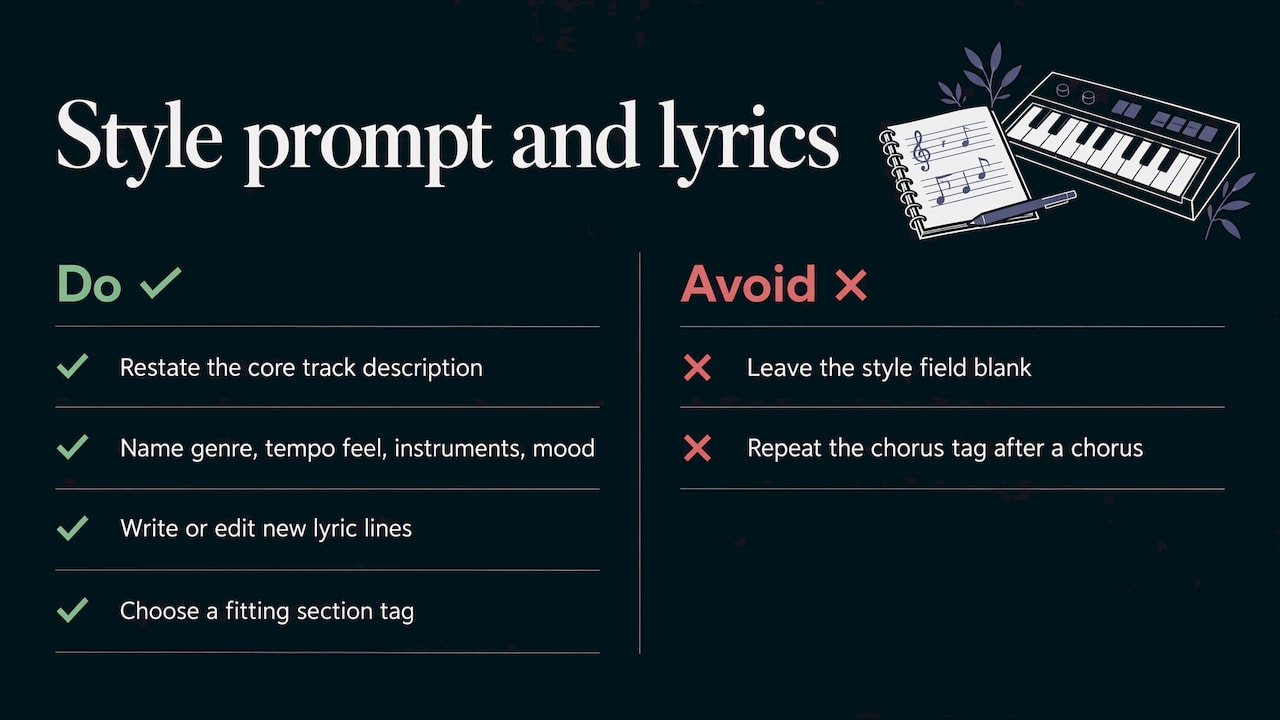
Restate the core description of the track in the style field instead of leaving it blank. Because the model remembers only recent context, an empty prompt invites it to drift toward a generic sound. A good prompt names genre, tempo feel, main instruments and mood, for example “dark synthwave, analog bass, driving four-on-the-floor, cinematic”. If the tool supports lyrics, write the new lines yourself, or generate them and edit.
If the tool uses section tags, open the extension with one that fits what should happen next, such as a bridge, an instrumental break or an outro. Repeating the chorus tag right after a chorus tends to make the song loop on itself.
5. Generate more than one version
Generate two or three takes and compare. Small prompt differences change energy and brightness, and one take will usually sit better against the original. Keep the same style description across takes so the differences come from the model and not from your wording.
6. Review the new section
Listen in three passes: once on speakers for overall feel, once on headphones for the join, and once with the video or voiceover playing if the music is a bed. Ask these questions:
- Does the tempo hold steady across the seam?
- Does the key stay the same, or does a chord sound wrong?
- Does the vocal timbre match, if there are vocals?
- Is there a click, a gap or a jump in volume at the join?
7. Export and keep the originals
Save the merged file, the original and the extension on its own if the tool allows it. Having the separate parts lets you re-do the transition later without regenerating everything.
Making the extension match the original
Matching is mostly about giving the model enough information and then correcting what it misses.
Style. Restate your descriptors every time you extend. If you extend twice, the second extension is working from the first extension’s audio, so errors compound. Keep the wording identical between runs.
Rhythm. Start on a downbeat and give the model several bars of context. If you know your track’s tempo, put it in the prompt. A quick tempo and key check on the finished file, with a free analyzer in your editing software, tells you whether the new part drifted before you build a video around it.
Mood and energy. Say where the track should go. “Builds to a full chorus” and “stripped back, atmospheric outro” produce different results from the same starting audio. Without direction, the model tends to repeat the energy level it just heard.
Vocals. Vocal timbre is the most noticeable drift. If a voice changes character at the join, shorten the extension, regenerate, or place the join where the voice is silent, such as an instrumental break.
Structure. The model is matching patterns, not reading a score, so you are the arranger. Decide in advance whether the extension is a second verse, a bridge or an outro, and name it in the prompt.
Editing the join so it sounds seamless
Even a good extension usually needs a small edit at the seam. These steps take a few minutes in any audio editor or video editor.
- Cut on the beat. Place the join on a downbeat. If the new audio starts slightly late or early, nudge it by a few milliseconds until the groove feels continuous.
- Crossfade briefly. A short crossfade over a few tens of milliseconds hides clicks. Longer fades blur the transient of the downbeat.
- Match loudness. If the new section is louder or brighter, bring it in line. Loudness is measured in LUFS, a unit that reflects how loud audio sounds to listeners; for context, the European broadcast recommendation EBU R 128 targets −23 LUFS for programs. Social platforms and streaming services set their own targets, so check the one you publish on. What matters inside your project is that both halves of the track measure close to each other.
- Check the low end. Bass frequencies from two separate generations can clash and cancel at the seam. Listen on a speaker that reproduces bass, or use a phase meter.
- Re-generate rather than repair. If the section regenerated louder or brighter than the one next to it, a fresh take is often faster than fixing it with EQ.
- Separate the parts if you can. When a tool offers stems, which are separate vocal and instrumental files, you can mix them yourself instead of accepting one welded file.
Using the extended track in video, podcasts and social posts
For video, work backwards from the cut. Decide the runtime and the moment the music should peak, then choose where to extend so that the build lands on that moment. Vertical clips for short-form feeds usually need the strongest section in the first seconds, so extend from the hook, not from the intro.
If your workflow is video-first, keeping music and visuals in one place saves exports and re-imports. In AiEnvoy, the AI Video Generator creates cinematic clips from text or images, and AI Video Dubbing translates and dubs finished videos into multiple languages, so one soundtrack can serve several markets. You can browse everything in the studio on the features page.
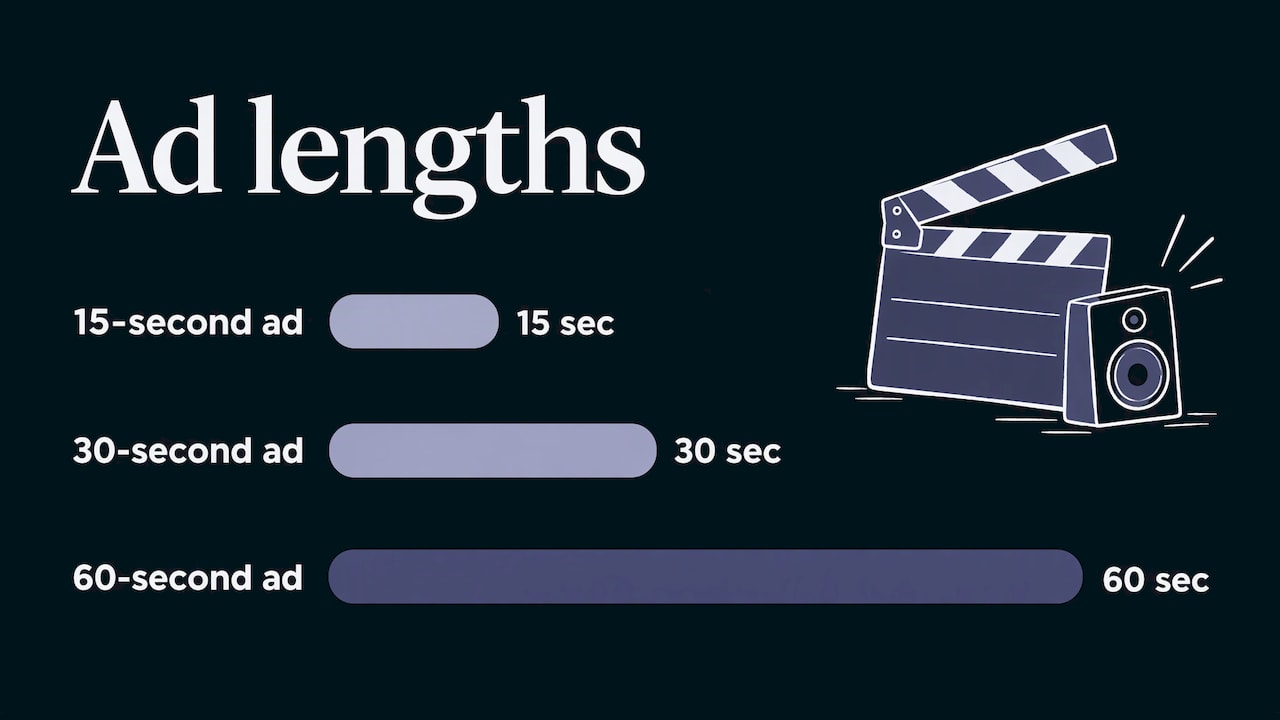
For podcasts, extend an intro or bumper instrumentally and skip vocals; there is nothing to drift. For ads, generate two or three lengths (15, 30 and 60 seconds) with the same style description so the campaign sounds like one family.
Rights to settle before you publish
An AI tool changes how the audio is made, not who owns the material you put in. Work through this short list before the track goes live.
- Do you own the source? Extending a commercial recording you do not own creates a derivative of someone else’s work, and many services forbid uploading audio you lack the rights to. Use your own recordings, music you have licensed with extension and editing rights, or tracks you generated yourself.
- Where will it be published? Each platform has its own terms for music in uploaded video.
- Personal or commercial use? Check whether your plan covers commercial use. This is a plan-level setting on most services, so read the terms for your tier.
- Who is the author? In the United States, the Copyright Office’s January 2025 report on copyrightability addresses works created using generative AI. Your own contribution, such as lyrics you wrote or how you arranged and edited the audio, is what you can point to as human authorship. If ownership matters for a release, talk to an entertainment attorney.
- Real voices and artwork. An AI visual layer or a voice-style prompt does not remove the rights attached to a real person’s voice, likeness or third-party artwork.
If you want a clean chain of origin for a campaign, start from a track you generate yourself with lyrics you write. Check the terms of your plan on the pricing page, which lists the Free plan at $0 per month along with Premium and Token Packs.
Common problems and quick fixes
| Problem | Likely cause | Fix |
|---|---|---|
| The extension sounds like a different song | Empty or vague style prompt | Restate genre, tempo feel, instruments and mood |
| The song loops on itself | Extension started with the same section tag | Start with a bridge, instrumental break or outro |
| A click or jump at the join | Cut off the beat, loudness mismatch | Move to a downbeat, short crossfade, match levels |
| Vocals change character | Model drift over a long extension | Shorten the extension, or join in an instrumental part |
| Key or tempo wanders | Long single generation | Extend in shorter steps and check each one |
| Extension too bright or loud | Regeneration shifted the vibe | Generate two or three takes and pick the closest |
Our view: build for the length you need
We see AI music extension as a good rescue tool and a poor starting point. When you extend, you inherit the seam: tempo to check, a key to confirm, loudness to match, vocals that may drift. Each fix is small, but they add up across a campaign with a dozen cuts.
That is why we think creators are better served by a studio where the whole piece is planned up front. In AiEnvoy, music, video, images and dubbing live in one app, so the track you make is shaped for the video it will sit under, and a single soundtrack can carry through to the dubbed versions. Our AI Music Generator is designed to produce songs with AI lyric generation and vocal recording, which means the lyrics and the voice are settled before the audio exists.
Our view is simple: decide the length, the structure and the lyrics first, generate once, and keep editing for the finishing touches.
the author
Make the full track in one place
If you are choosing a tool for music that has to fit a video, start with the AI Music Generator. It creates songs and music tracks with AI, including lyric generation and vocal recording, and sits alongside AI video, image, dubbing and writing tools in a single studio. The Free plan costs $0 per month, so you can see how it fits your workflow on the pricing page.
Teams that publish at volume can also look at AutoPilot and the template library on the features page, which are designed to cut repetitive production work.
FAQ
Can AI extend any song?
Technically, most tools accept an uploaded audio file and continue it. Legally and practically, it is a different question. Use audio you own or have licensed, because extending someone else’s recording creates a derivative work and many services forbid uploading material you lack rights to. Simple, rhythmic material with a clear groove extends best.
How long can an extended track be?
It depends on the tool and the plan. Limits on input length, total length and file size differ between services, so check the tool’s own documentation before you start. Whatever the limit, shorter extensions in several steps tend to hold tempo, key and vocal tone better than one long generation.
Why does my extension sound different from the original?
The model works from recent audio and a short memory, so details like vocal tone, mix balance and brightness can shift. Restate your style description in the prompt, start on a downbeat, generate a few takes, and match loudness at the join. If the difference remains, shorten the extension or join during an instrumental section.
Do I need music software to join the pieces?
Many tools merge the parts for you, but a quick check in any audio or video editor helps. A short crossfade and a loudness match fix most seams. For finer control, work with separate stems when the tool provides them.
Can I use an extended track in a monetized video?
That depends on who owns the source audio and on the commercial terms of the plan you used to generate it. Read both before you publish. For anything high-stakes, such as a paid campaign or a commercial release, ask an entertainment attorney.
Sources
- Generate Music Using Meta’s MusicGen: continuation from an audio file
- U.S. Copyright Office, Copyright and Artificial Intelligence, Part 2: Copyrightability (January 2025)
- EBU R 128 loudness recommendation
Recommended
Put this workflow into practice with AiEnvoy
Create videos, AI music, and multi-language dubbing with Sora, Kling, Veo, and Seedance 2.5 — or connect our Developer APIs.