Creative Asset Management for Creators and Marketing Teams
Creative asset management explained for creators and marketers: naming, metadata, approvals, rights and reuse, plus how to keep generated media organized.

Creative asset management is how you organize, review, approve, store and reuse the videos, tracks, images and voiceovers your team produces, from the first brief to the last repost. The fastest way to get it right is to manage assets where they are made, so every file starts with a name, a status and a home. We built AiEnvoy as one studio for video, music, images and dubbing for that reason: fewer tools means fewer scattered files.
This guide is for creators, musicians, marketers and social media managers. It skips enterprise software buying and focuses on the system you can set up this week.
TL;DR
- Creative asset management covers the whole life of a file: request, production, review, approval, storage, reuse and retirement. It is wider than a storage folder.
- Most delays come from vague requests and feedback scattered across email and chat. Fix intake and review before you reorganize folders.
- Use one naming pattern, a short list of required fields (status, campaign, channel, rights, expiry) and open tags for everything else.
- Record who approved which version, and store licence and AI-usage notes with each asset.
- Producing and organizing in a single studio, such as AiEnvoy’s feature set, keeps video, music, image and voice assets in one workflow.
Table of Contents
- What creative asset management means
- Why it matters when you publish constantly
- The seven stages of a creative asset’s life
- Name and tag assets so you can find them in ten seconds
- Approvals, permissions and version control without the chaos
- Rights, licences and AI-generated assets
- Managing video, audio and images across channels
- A one-week setup for a small team
- Put it into practice with AiEnvoy
- FAQ
- Sources
What creative asset management means
The term sounds like software, but it is first a habit. One guide to the discipline defines it as organizing, reviewing, approving and distributing creative work across its production lifecycle. Another guide adds storing files and the workflow that moves them from brief to finished asset.
Three neighboring terms get mixed up with it:
- DAM (digital asset management): the library where approved, final assets are stored, tagged and retrieved.
- MAM (media asset management): a system built for heavy video and audio production, with timecodes and proxy files.
- CMS (content management system): the tool that publishes pages to a website. It organizes content around the page, not the asset.
The difference is where the work happens. Creative asset management follows a file while it is still being made and argued over. A DAM takes over once the file is final. Cloudinary’s comparison says CAM is judged by review cycle time, revision rounds and on-time delivery. DAM is judged by time to find an asset, reuse and brand compliance.
If you are a solo creator or a small marketing team, you need both halves. You need a way to move work forward and a library you can trust.
Why it matters when you publish constantly
Short-form video, release-day music and multi-channel campaigns multiply files quickly. One concept becomes a vertical cut, a square cut, a trailer, three captions, a dubbed version and a cover image. Without a system, you spend your time hunting for the right version.
The evidence for the payoff comes mostly from large organizations, so read it as direction, not a promise. A Forrester Total Economic Impact study of one DAM deployment, published in June 2024, modeled $2.9 million in business value. It also found that sales staff needed fewer clicks to find a logo, falling from 147 to 84 per month. Your numbers will be smaller, but the cause is the same: findability and reuse remove repeated work.
The same Cloudinary guide lists benefits you can feel at any size:
- You save time because assets sit in one searchable place.
- You protect brand consistency by pulling from one approved library.
- You cut rework, because version control means feedback lands on the current file.
- You lower compliance risk by storing licence terms and expiry dates with each asset.
The seven stages of a creative asset’s life
The guide maps seven stages: request and brief, production, review and approval, versioning, storage and tagging, distribution, and measurement and retirement. It also notes that most delays happen at the first and third stages. Vague requests and feedback scattered across email and chat cost more time than messy folders do.
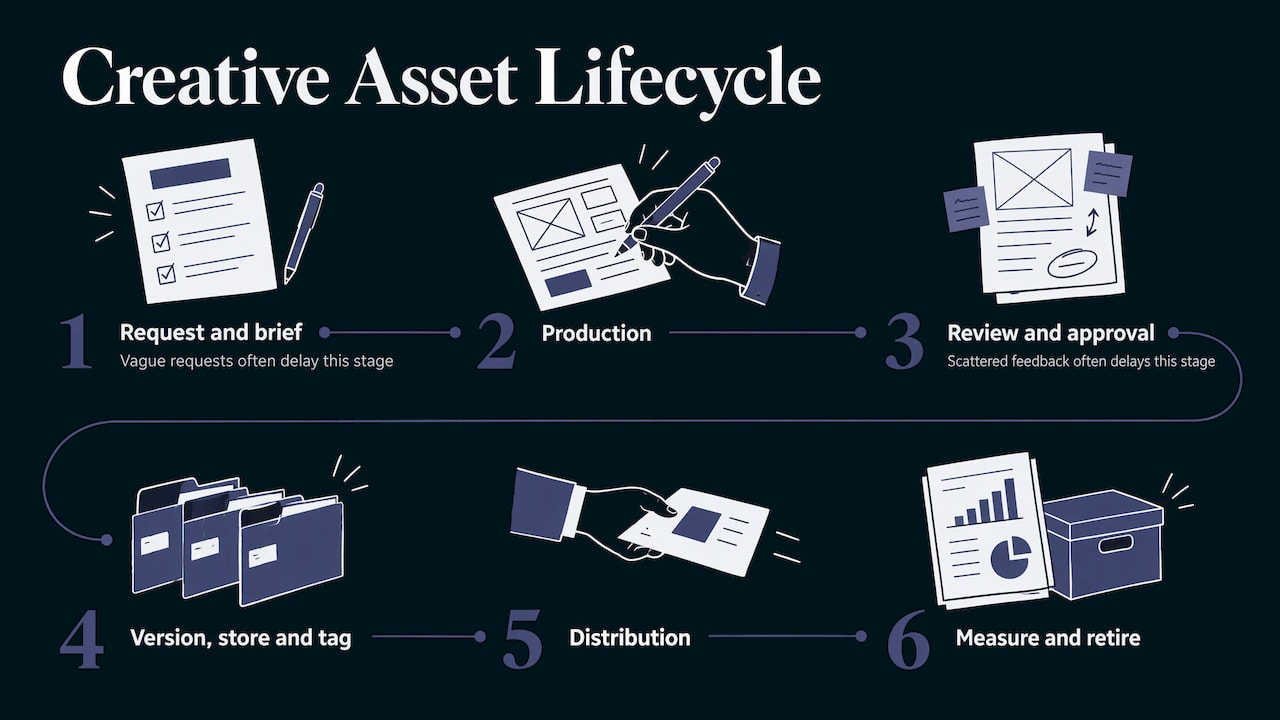
Here is what each stage looks like for a small team.
1. Request and brief
Write down the goal, the channel, the format, the deadline and who approves it. Even a solo creator benefits from a three-line brief, because it becomes the metadata later. A good brief is the cheapest fix in this whole guide.
2. Production
This is where a generative studio saves the most time. In AiEnvoy you can generate cinematic video from text or images, music and songs, image transformations and multi-language dubbing from one account. Creating inside one studio means you are not renaming and re-uploading files between four separate apps just to keep a project together.
3. Review and approval
Approval is a decision, not a comment. A workflow guide says the process should record who approved which version and when. It also says feedback should be pinned to the asset itself, such as a frame, a region or a line, instead of spread across chat threads.
4. Versioning
Keep every version, but make only one “current.” Use zero-padded version numbers (v01, v02, v10) so files sort correctly in any folder.
5. Storage and tagging
This is where naming and metadata do their work. The next section covers it.
6. Distribution
Distribution means sending the approved version to the right channel in the right size. Repurposing is where creators lose hours, so build it into the plan: one master, several cut-downs, each tied to the master by name.
7. Measurement and retirement
Note which assets performed, and retire anything whose licence, offer or campaign has ended. Retirement keeps outdated files from being reused by accident.
Name and tag assets so you can find them in ten seconds
Search is the payoff of everything above. Teams that skip naming rules end up with files called “final_v3_REAL.mp4.” A simple system has three parts: a filename pattern, a few fields with fixed values, and open tags.
A filename pattern that survives export
One asset library setup guide suggests a pattern such as brand, campaign, descriptor and version, for example stur_springlaunch_hero-bottle_v02, with zero-padded version numbers. Another guide recommends a Campaign_ProductLine_Channel_Version convention, documented in a style guide so everyone uses the same terms. A name that carries its own context stays identifiable even when it leaves your library and lands in someone’s downloads folder.
For a creator, a workable version looks like this:
| Asset | Example filename |
|---|---|
| Product teaser video | novabrand_fallsale_teaser-9x16_v03.mp4 |
| Song master | midnightdrive_single_master_v01.wav |
| Social cover image | novabrand_fallsale_cover-1x1_v02.png |
| Dubbed video | novabrand_fallsale_teaser-es_v01.mp4 |
Pick your own order, write it down, and do not change it mid-year.
Fields for finite values, tags for the rest
The same Playbook guide gives a rule worth copying: values that are finite become fields, and open descriptive values become tags. Fields would be status (draft, in review, approved, retired), campaign, channel, owner, rights and expiry date. Tags would be things like “beach,” “founder interview” or “upbeat.” Fields make filtering reliable. Tags make browsing flexible.
Keep the required fields few. If tagging takes longer than making the asset, nobody will do it. Tag at the moment you save, not in a cleanup sprint next quarter.
Let templates do the repeating
Repeated setup work drains creative energy. A creative operations guide from Lytho calls repetition the best-known killer of creativity and advises templating the repetitive parts. In practice that means a saved format for your vertical videos, a standard cover layout, and a reusable character or voice. AiEnvoy offers a library of curated templates and reusable AI character profiles for this reason: the part that should repeat does, and the part that should differ stays yours.
Approvals, permissions and version control without the chaos
Review is where most small teams lose days. A few rules prevent most of the loss.
- One place for feedback. Comments in email, chat and voice notes are impossible to reconcile. Pick one channel and say so in the brief.
- Name the approver. One person, or one ordered list, signs off. An overview of the five pillars of creative asset management notes that sequential review suits cases where one reviewer’s feedback informs the next, such as legal after creative sign-off. Parallel review works when stakeholders judge independently.
- Cap the rounds. Two revision rounds, agreed up front, keeps a short video from becoming a month-long project.
- Log the decision. Write down who approved which version and when. If a client asks later, you have the answer.
- Scope access. Freelancers and agencies should see the campaign folder they work on, not your whole library.
For musicians, the same logic applies to stems, alternate mixes and masters. Label the approved master clearly and archive the working files. Our music production workflow guide walks through the steps from idea to release.
Rights, licences and AI-generated assets
The most expensive asset mistake is publishing something you were never cleared to use. Store rights information with the asset, not in a separate spreadsheet. Fields to require before approval:
- Licence or consent status
- Effective and expiry dates
- Whether external sharing is allowed
- The approver and the intended channel
These are the same fields an agency asset management guide asks for before approval or delivery. It adds that free-text and AI-generated tags help discovery but should not decide approval, rights or confidentiality. For music in particular, a clear walkthrough of game music licensing shows how permissions and commercial-use terms should be recorded before a project ships.
Generated media adds one more question: who owns the output. In the United States, the Copyright Office released Part 2 of its AI report on January 29, 2025. It says AI used to assist creation, or AI-generated material included in a larger human-made work, does not bar copyright. It also says protection does not extend to material whose expressive elements are determined by a machine. So keep your prompts, edits, arrangements and human contributions on record with the asset, and talk to an attorney about anything with high commercial stakes. Rules differ by country, so check your own jurisdiction.
Managing video, audio and images across channels
A campaign asset rarely lives in one format. A practical routine:
- Keep a master. Save the highest-quality approved version first.
- Derive, don’t recreate. Make each channel cut from the master and name it with the channel.
- Localize last. Dub or translate only after the master is approved, so you do not redo it every time a visual changes.
- Link the family. Every derivative shares the campaign and master name, so a search for the campaign returns all of it.
This is where an all-in-one studio helps. With AiEnvoy you can clip long videos into short-form pieces, dub the result into other languages and keep the character or voice consistent across all of them. Our AutoPilot feature automates content creation and scheduling, so repeat formats follow your plan instead of your memory.
A one-week setup for a small team
- Day 1: Write your filename pattern and your five required fields. Put them in one shared document.
- Day 2: Create the folder or board structure: one top-level space per brand or channel, one subfolder per campaign.
- Day 3: Move your ten most reused assets in and rename them. Do not migrate everything.
- Day 4: Set approval rules: who signs off, how many rounds, where comments go.
- Day 5: Add rights and expiry fields to anything with a licence, a music cue or a talent release.
- Day 6: Build two or three templates for your most repeated formats.
- Day 7: Review what was hard to find and fix the tags.
One guide to the topic argues that the workflow should live in the same place as the files. Otherwise teams end up managing it in spreadsheets and chat apps. That principle is the reason to prefer fewer tools.
Our view: manage assets where they are made
Most advice on creative asset management starts after the file exists. You export from one tool, upload to another, then try to tag it. We think that is backwards for creators and small marketing teams.
AiEnvoy puts video, music, images and voice into one studio. Our reusable AI character profiles, curated templates and smart asset management are designed to keep a project’s pieces together, and AutoPilot is designed to automate repeat content. When production and organization share a home, naming and approval happen as part of the work, not as cleanup.
Our positioning is simple: one app instead of many specialized tools. For a social media manager shipping daily or a musician releasing a single with a video, that means fewer handoffs and fewer lost files.
the author
Put it into practice with AiEnvoy
If you want production and organization in one place, start with the AiEnvoy studio. You can generate videos, music, images and dubs, reuse characters and templates, and automate repeat content with AutoPilot. The Free plan costs $0 per month, and you can compare it with Premium and Token Packs on the pricing page.
Teams that build on our tools through code can see the API options for text-to-video, image-to-video, dubbing and translation.
FAQ
What is the difference between creative asset management and digital asset management?
Creative asset management follows work in progress through briefing, production, review and approval. Digital asset management is the library for finished, approved files. Small teams usually need both, and a single naming system can serve each.
Do I need special software to start?
No. A written filename pattern, five required fields and a clear approval rule give you most of the benefit. Software helps when volume grows. A studio that creates and organizes in one place, like AiEnvoy, reduces how much you have to manage.
How should I name creative files?
Use a fixed order, such as brand, campaign, descriptor, channel and version, with zero-padded version numbers like v01 and v02. Write the rule down and apply it from the first save. Names should still make sense when a file is sent outside your library.
How do I handle rights for AI-generated content?
Store the tool, date, prompt and any edits you made with the asset, plus licence or expiry details for any third-party material. The U.S. Copyright Office has said that human contribution matters for protection. For commercial campaigns, confirm your situation with an attorney.
What should I track for reuse?
Track status, campaign, channel, owner, rights and expiry date. Add open tags for subject and mood. Those few fields make most searches work and keep expired material from being reused.
Sources
- A complete guide to creative asset management (Ziflow)
- Creative Asset Management: Workflow, Software & Best Practices (Cloudinary)
- Creative Workflow Management: Phases, Tools & Steps (Cloudinary)
- The Total Economic Impact of Wedia’s DAM (Forrester)
- How to Structure a Digital Asset Library (Playbook)
- Best practices for creative asset tagging and metadata management (Storyteq)
- The Complete Creative Operations Guide (Lytho)
- Creative Asset Management for Agencies (ContentCloud)
- What is creative asset management? (Focal)
- Copyright Office Releases Part 2 of Artificial Intelligence Report (U.S. Copyright Office)
Recommended
Put this workflow into practice with AiEnvoy
Create videos, AI music, and multi-language dubbing with Sora, Kling, Veo, and Seedance 2.5 — or connect our Developer APIs.