Social Media Content Automation: A Workflow That Keeps Quality
Social media content automation done right: what to automate, a five-stage workflow, what to keep human, and how to measure whether it saves time and lifts results.

Social media content automation works when software handles the repeatable production and publishing work, and a person keeps the ideas, the facts and the final approval. For video-first teams, the biggest time sink is not scheduling. It is making the clips, images, audio and translated versions that fill the calendar. That is the part we built AutoPilot and the rest of the AiEnvoy studio to take off your hands. Below is how to set up the whole system, step by step, and how to tell whether it is paying off.
TL;DR
- Automate in two layers: production (video, images, audio, captions, dubbing) and distribution (adapting, queuing, scheduling). Most teams automate only the second and stay stuck on the first.
- Build the workflow in five stages: capture ideas, draft in your voice, produce assets, adapt per platform, schedule behind an approval step.
- Keep humans on claims, tone, sensitive replies and the approve button. Automation should never publish unreviewed material.
- Measure against a baseline you record before you switch anything on, and net time saved against the time spent fixing output.
- AiEnvoy puts video, music, image, voice and scheduling tools in one place, with a Free plan at 0 USD per month to start.
Table of Contents
- What social media content automation actually covers
- Why the production layer is the bottleneck
- A five-stage workflow you can copy
- What to keep human
- How to measure whether automation is working
- Where AiEnvoy fits
- Our view on automating content
- FAQ
- Sources
What social media content automation actually covers
The phrase is used loosely, so it helps to split it. Social media content automation means using software, rules and increasingly AI to handle repeatable steps in getting content from idea to published post. Those steps fall into four groups:
- Creation: drafting captions, generating video, images, music or voiceover.
- Adaptation: resizing and reformatting one asset for each network, rewriting the opening and length per platform.
- Scheduling and queuing: loading posts into a calendar and publishing at set times.
- Recycling and engagement: re-posting evergreen pieces, and rule-based replies or alerts.
Search results for this topic are dominated by scheduling tools and connector platforms. They are good at groups 3 and 4. If you are a creator, marketer or social media manager who publishes video, though, groups 1 and 2 are where your hours go. A scheduler cannot make a 20-second cinematic clip or a Spanish-language version of last week’s best performer. A creative studio can.
A concrete example: you publish one product story per week. Without automation, you write a script, shoot or source footage, edit, cut vertical and square versions, caption them, dub them for a second market, then upload to four apps. With a production layer automated, the story becomes one prompt or one source video, and the versions come out of the same system.
Why the production layer is the bottleneck
Most automation guides start with scheduling because it is easy. You pick a time, the tool posts. But scheduling saves minutes per post, while producing a finished video takes hours. If your calendar runs five days a week across three platforms, production is where the automation pays back.
This is also why multiple specialized tools get expensive in attention rather than money. One app for text-to-video, another for music, another for dubbing, another for clipping, another for scheduling: each hand-off is a file to export, rename and upload again. Consolidating the chain removes those hand-offs, which is the practical argument for an all-in-one studio.
AiEnvoy brings the models creators ask about, including Sora, Kling and Veo, into one AI video generator, alongside music, image, dubbing and writing tools on the features page. You do not need professional editing experience to use them.
A five-stage workflow you can copy
Several practitioners describe the same basic shape. One solopreneur workflow keeps judgment with the human while AI runs signal capture, ideation, drafting from a voice file, separate adaptation per platform and scheduling behind an approval step. A longer eight-lane architecture adds briefing, compliance checks, an asset library and an analytics loop. The version below merges them into five stages for a small team.
Stage 1: Capture ideas
Collect raw material in one place: customer questions, comments, product updates, past top posts, trending formats in your niche. Automation here can be as simple as a shared inbox or sheet that you feed daily. The goal is a steady supply of real subject matter so the AI never has to invent anything.
Where it goes wrong: feeding the system nothing and asking it for “ideas.” You get generic posts that sound like every other account.
Stage 2: Draft in your voice
Write a short voice file: how you open, words you use, words you never use, how you end. Give the writing model that file plus the source notes for each idea. Our AI writing tools are built for this kind of content drafting and chat-based refinement.
Where it goes wrong: letting the model supply facts. Treat AI as strong at reshaping tone and length, and keep the core message and every factual claim authored or checked by a person.
Stage 3: Produce the assets
This is the stage most guides skip. Turn each approved draft into the media it needs:
- Video from text or an image: the AI Video Generator creates cinematic clips from a prompt or a still.
- Short clips from long video: the AI Video Clipper cuts longer recordings into short-form pieces.
- Images: the AI Image Generator transforms images across artistic styles.
- Music and voice: the AI Music Generator produces tracks with AI lyric generation and vocal recording, useful for original soundtracks that avoid licensing hunts.
- Consistent faces: reusable AI Characters keep the same character profile across posts, so a series looks like a series.
- Templates: a templates library gives you a starting layout instead of a blank canvas.
Where it goes wrong: regenerating until something looks right with no brief. Write the visual brief once (subject, style, length, mood), save it, and reuse it. Reusable character profiles and templates exist for exactly this reason.
Stage 4: Adapt per platform
One asset should not go everywhere unchanged. Keep the original claim and your point of view, and change the opening, rhythm, length and call to action to fit the platform. A useful habit from the same workflow: have the system return both the adapted post and a one-sentence note on what it changed, so your review takes seconds.
For global audiences, adaptation includes language. AI Video Dubbing translates and dubs videos into multiple languages with natural AI voices, so a winning post in English can run in other markets without a reshoot.
Where it goes wrong: copying the same caption to every network, or dubbing without a native speaker glancing at the script of a high-stakes post.
Stage 5: Schedule behind an approval step
Queue everything as a draft that a person must approve. Only approved items publish. AutoPilot is our answer for this stage: it handles automated AI content creation and scheduling, so generation and the calendar sit in the same place rather than in two tools you have to bridge.
Where it goes wrong: switching to fully hands-off publishing in week one. Earn that by reviewing for a few weeks and seeing how often you change anything.
What to keep human
Automation is not all-or-nothing. The pattern across practitioner guides is consistent: the more a post depends on judgment, the more a person should own it. Keep these under human review:
- Factual claims, numbers and promises. AI can phrase a claim. It should not be the source of one. One practitioner approach compares every factual statement against your source notes before anything is scheduled.
- Brand and compliance checks. A small ruleset the model sees before each draft, covering claims, attribution, disclosure and banned phrases, catches most problems early. If you work with sponsors or make product claims, run a person’s eyes over those posts every time.
- Sensitive conversations. Complaints, crises, news-adjacent moments and anything emotional. A scheduled cheerful post on the wrong day is a known way automation damages a brand.
- Realistic people and scenes. If a video shows a realistic person or event, check the current labeling and disclosure rules of each platform you post to, since they are updated often.
- The approve button. The simplest guardrail is also the strongest: nothing goes live unreviewed.
The point is not to slow you down. A review pass on ten ready-made drafts takes a fraction of the time of creating ten posts, and it is the part where your expertise adds the most value.
How to measure whether automation is working
“We post more” is not a result. Use a before-and-after comparison.
Record a baseline first
Before you automate, note your normal numbers over several weeks: engagement rate, click-through rate, replies or DMs, follower growth, and hours spent. The recommended approach is to compare later performance at the same posting volume and content mix, so you are not crediting automation for a change in how much you post.
Compare AI-assisted and human-made posts
Tag each post as AI-assisted or human-made, then judge both with the same metrics over the same window. Comparing engagement and reach-quality signals such as engagement rate, views, comments, shares and saves shows whether the automated content holds up, and which formats deserve more of your time.
Net your time savings
Raw time saved flatters automation. A better figure is accuracy-adjusted time saved: the time you save minus the time you spend correcting or quality-checking output. The same framework suggests looking at efficiency, quality, business impact and trust together, so you do not optimize one while harming another.
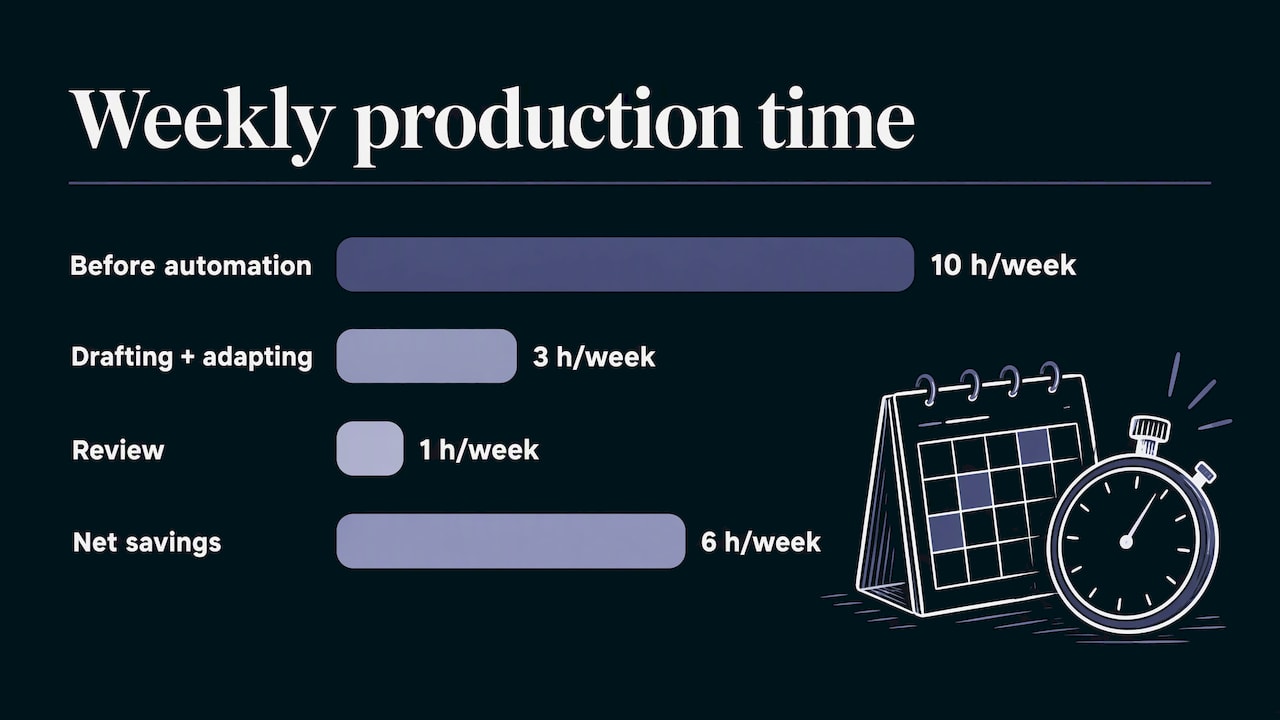
A worked example with made-up numbers for illustration: a manager spends 10 hours a week on four short videos. After automating production, drafting and adapting take 3 hours and review takes 1 hour. Net savings: 6 hours. If engagement rate holds against the baseline, the automation is working. If it drops, the fix is in the brief and the review step, not in posting less.
A simple weekly routine
- Tag every post as AI-assisted or human-made.
- Pull the same five metrics every Friday.
- Log hours spent on drafting, producing and reviewing.
- Once a month, compare against your baseline and update your briefs with what won.
Where AiEnvoy fits
If your content is video, music, images or voice, AiEnvoy covers the production layer in one studio: cinematic video from text or images, automated short-form clipping, original music and songs, image transformations, multi-language dubbing, AI writing tools, reusable AI characters and a templates library with smart asset management. AutoPilot connects creation and scheduling.
You can start on the Free plan at 0 USD per month and look at the Premium plan and Token Packs on the pricing page when your volume grows.
Teams that build their own pipelines can use the Text-to-Video API and Image-to-Video API, or the AI Dubbing API, to plug generation into their existing systems.
Our view on automating content
Most advice on social media automation treats the job as a scheduling problem. We think it is a production problem. A calendar is easy to fill when you have finished assets, and nearly impossible to fill when each video takes an afternoon.
That is why AiEnvoy is a single studio rather than a set of separate tools. Video, music, images, voice and dubbing share one place, with reusable character profiles and templates so your content stays consistent from post to post. Creators and marketers without professional editing experience can make cinematic work, and small teams can publish at a pace that used to need a studio.
Our advice is to automate the making and the moving, and keep the meaning. Decide the message, check the facts, press approve. Let the platform do the hours of work in between.
the author
FAQ
What is an example of content automation?
Take one long video. Software clips it into short vertical pieces, generates captions, dubs a version in another language and queues each piece for the right platform. You review the batch and approve it. Production, adaptation and scheduling were automated; the idea and the sign-off stayed with you.
Can you fully automate social media posts?
Technically yes, but we recommend an approval step before anything publishes. AI is good at reshaping tone and length and weaker as a source of facts or promises. Start with review on every post, and loosen it only for low-risk, recurring formats once you have seen how often you edit.
What should you never automate?
Keep people on factual claims, sponsored or regulated content, crisis and complaint responses, and any video showing realistic people or events. These carry the highest cost if wrong, and a short review is cheap insurance.
How do I know automation is saving time?
Record your hours and engagement metrics before you start, then compare at the same posting volume. Subtract correction and review time from the hours saved. If engagement holds and net hours drop, it is working.
Do I need separate tools for video, music and scheduling?
Not with AiEnvoy. The features page lists video, clipping, music, image, dubbing and writing tools, and AutoPilot adds automated creation and scheduling in the same platform.
Sources
- AI for Social Media Content: A Solopreneur’s Workflow
- How to Automate Your Content Creation Process with AI
- How Do You Measure Whether Automated Twitter Posting Is Working
- How to Develop an AI Content Strategy for Social Media
- AI KPIs for Publishing: Measure Real Impact
Recommended
Put this workflow into practice with AiEnvoy
Create videos, AI music, and multi-language dubbing with Sora, Kling, Veo, and Seedance 2.5 — or connect our Developer APIs.