How to Generate Songs From Lyrics With AI, Step by Step
Turn lyrics into a finished song with AI: how to format your words, pick genre and tempo, refine the take, and check usage rights before you publish.
You can turn finished lyrics into a full song with vocals in a few minutes. Paste the words into an AI music generator, describe the style, generate several takes, then keep the best one and polish it. The quality of the result depends far more on how you prepare the lyrics and the style brief than on which button you press. The rights to the finished file depend on the platform’s terms and on US copyright rules, so check those before the song goes into a campaign.
This guide is for creators, musicians, marketers and social media managers who already have words and need a track. In AiEnvoy’s AI Music Generator, you work in the same studio you use for video, so the song can go straight into a clip.
TL;DR
- Mark your lyrics with section labels (verse, chorus, bridge) and keep lines short and singable. Structure is the biggest quality lever.
- Describe the song in a style prompt: genre, mood, tempo range, two or three instruments and the vocal type. Specific beats poetic.
- Generate several takes of the same lyrics and pick the best one. Do not expect take one to be the keeper.
- In the US, a prompt alone does not make you the author of AI output, but your own lyrics can still be protected. Keep a record of what you wrote.
- Check the commercial-use terms of your plan before you publish, and credit honestly what was generated.
Table of Contents
- What happens when you turn lyrics into a song
- Step 1: Prepare your lyrics so they sing well
- Step 2: Write a style prompt that gets a usable genre, mood and tempo
- Step 3: Generate, compare and pick the best take
- Step 4: Refine the track
- Step 5: Check the rights before you publish
- Common problems and quick fixes
- Our view: write first, generate second
- Make your song in AiEnvoy
- FAQ
- Sources
What happens when you turn lyrics into a song
An AI song generator takes two inputs: the text to be sung and a description of how it should sound. It returns audio with a melody, an arrangement and a synthetic singer performing your words. You supply the content and the direction. The model supplies composition, instruments and voice.
That split explains most of what goes right and wrong. The model decides where the stresses fall, how long each line lasts and where the hook lands. If your lyrics are uneven, with one line of five syllables followed by one of nineteen, it has to improvise, and the singing sounds rushed or stretched. If the style brief is vague, you get a generic middle-of-the-road track.
So the work happens before you generate: shape the lyrics, write a precise brief, then judge the results like an editor.
Step 1: Prepare your lyrics so they sing well
Most disappointing AI songs trace back to the text. Spend ten minutes on these points first.
Label every section
Put a tag above each block, such as [Verse 1], [Chorus], [Verse 2], [Bridge], [Final Chorus]. Generators use these labels to place the hook and change energy. Repeat the chorus text in full each time it appears rather than writing “repeat chorus”, because the model reads only what is on the page.
Keep lines even and short
Aim for lines of roughly similar length, usually six to twelve syllables. Read each line aloud at the pace of a song. If you run out of breath, the singer will too. Split long sentences into two lines and cut any line that explains what the next one says.
Write for the ear
Simple rhymes and repeated phrases make a chorus stick. Avoid abbreviations, numerals and unusual spellings in the sung text, because the model may pronounce them unpredictably. Write “twenty twenty-six” as you want it sung, and spell a brand or character name phonetically if the first take mangles it.
Decide the length
Two verses, a chorus repeated three times and a short bridge typically produce a track of around three minutes. Adding more verses does not make the song better, only longer. If you later need a longer track, extend it deliberately instead of stuffing in more lyrics.
If you only have a rough idea
When you have a theme but not finished words, draft them first. AiEnvoy includes AI writing tools for content and creative help, and the music studio offers AI lyric generation, so you can go from a brief to a lyric sheet without leaving the platform. Edit the draft by hand afterward. Lines you rewrote yourself are also the part you can most clearly claim as your own (more on that below).
Step 2: Write a style prompt that gets a usable genre, mood and tempo
The style field is where you steer the music. Think of it as a brief to a session band. Five elements cover it.
| Element | What to write | Example |
|---|---|---|
| Genre | One main genre, optionally one sub-style | indie pop, synthwave, acoustic folk |
| Mood | Two emotional words | hopeful, nostalgic |
| Tempo | A range or a feel | mid-tempo, around 100 BPM |
| Instruments | Two or three, no more | warm piano, brushed drums, upright bass |
| Vocal | Gender, register, delivery | female alto, breathy, close-mic |
BPM means beats per minute. A walking pace feels like about 100, a pop dance track sits around 120 and a ballad is often 60 to 80.
Pick for the use, not just the taste
A 15-second social clip needs a hook in the first few seconds, so choose an energetic tempo and a chorus-first lyric. A brand film or product video usually wants space for a voiceover, so ask for a softer vocal and sparse instrumentation. A song you plan to release as a single needs a full verse-chorus arc and a vocal you would not mind hearing for three minutes.
Do not stack contradictions
“Aggressive, calm, EDM, acoustic ballad” gives the model nothing to commit to. One genre and two mood words are enough. If you want a blend, name the main genre first and the flavor second, for example “folk with a light electronic pulse”.
Treat tempo as a target, not a guarantee
Generators interpret tempo loosely. In one published hands-on test of a popular AI song tool, a requested 96 BPM came back at 112.6 BPM on one take, and requested key changes did not appear in any measured take. The practical lesson: state the tempo you want, listen to the result, and plan on choosing among several takes. If a precise tempo or a key change matters, handle it in an editor afterward.
Step 3: Generate, compare and pick the best take
Run the same lyrics and style at least three to four times. Variation between takes is large, and the best one often differs on exactly the points you care about: where the chorus lifts, how the singer handles the hook, whether each word is clear.
When you listen, go through the same short list each time:
- Lyrics: Does every line you wrote get sung, in order? Note any dropped or swapped words. In the same hands-on test, sung English choruses came out very accurate while some other languages lost lines or drifted, so listen closely if your lyrics are not in English.
- Hook: Is the chorus the most memorable moment by the 45-second mark?
- Phrasing: Do stressed syllables land on strong beats, or does the singer rush?
- Energy arc: Does the song grow from verse to final chorus, or stay flat?
- Ending: Does it resolve, or does it cut off?
If a take is nearly right, change one thing and regenerate: shorten a line, adjust a tag, swap an instrument. Changing three things at once leaves you unable to tell what helped.
Step 4: Refine the track
A good raw take can still sound “AI” until you finish it. You have three levels of polish, and each one is optional.
Fix the text first. Misread words are cheaper to solve in the lyric field than in audio. Respell the word phonetically and regenerate.
Add or replace vocals. A recorded human vocal over the generated backing is the strongest way to make a song feel like yours. AiEnvoy’s guide to adding vocals to music covers recording, aligning and mixing, and the studio includes vocal recording for exactly this workflow.
Mix it like any recording. If you work in a digital audio workstation, treat the AI vocal as you would a recorded one: cut harshness with subtractive EQ, tame sibilance with a de-esser, add gentle compression, then your own reverb or delay, as one production guide recommends.
For video work, layer in ambient sound or transitions to make the music sit in the scene. Our notes on AI sound design for video and music and sound effects for your videos show how.
Step 5: Check the rights before you publish
This is the step most people skip, and it matters most for marketers and anyone monetizing content. The rules below describe US law. Other countries differ.
What US copyright law says
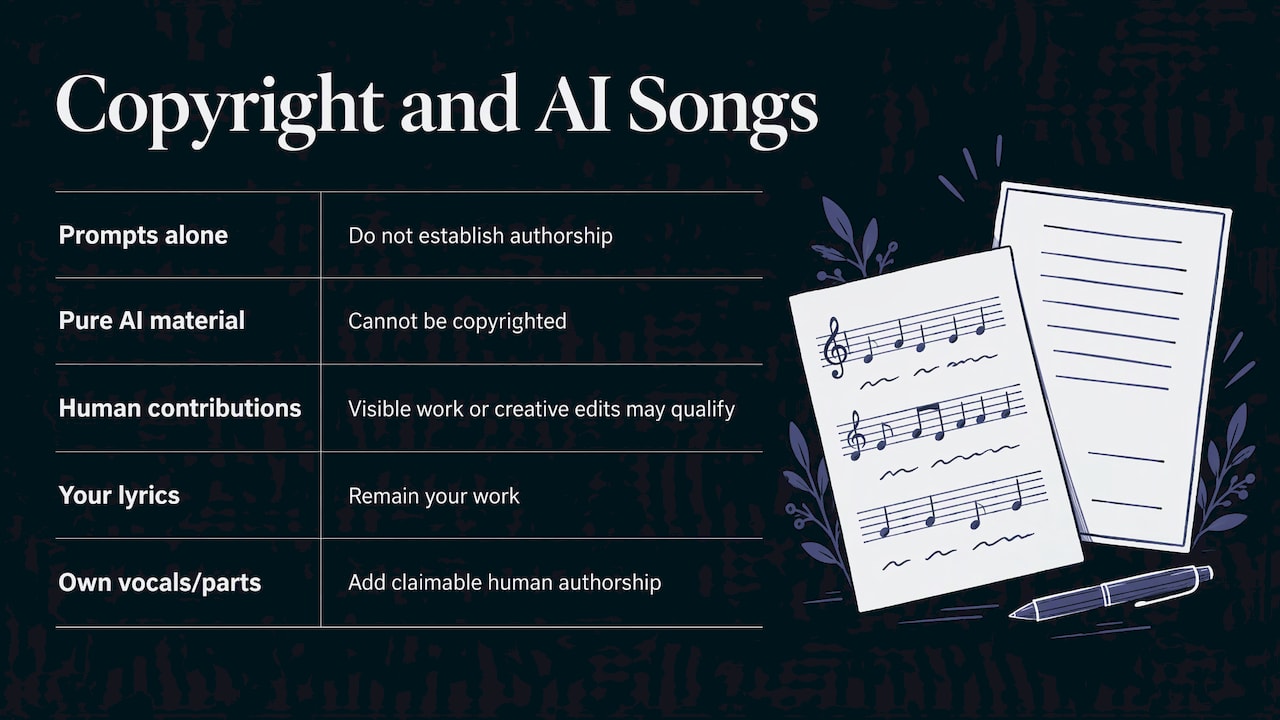
The U.S. Copyright Office published Part 2 of its report on copyright and AI in January 2025. Its conclusions, in plain terms: prompts alone do not make you the author of the output, purely AI-generated material cannot be copyrighted, but human-authored material that remains visible in the result can be, and so can your own creative selection, arrangement or modification of AI output.
For a song built from lyrics, that means your lyrics stay your work even when a model sings them. The melody, arrangement and synthetic voice, generated from a style prompt, probably do not earn you copyright on their own. Recording your own vocal or composing your own parts adds human authorship you can claim.
What the platform lets you do
Copyright and permission to use a file are two different things. The platform’s terms decide whether you may use a track commercially, in ads, on streaming services or in client work, and those terms often differ between free and paid plans. Read the terms for the plan you generate on before you create anything you intend to publish, because rights on a paid plan do not always reach back to tracks made earlier on a free one. On AiEnvoy, plan details are on the pricing page.
Practical habits
- Keep your original lyric document with its date, plus a log of prompts and any edits you made.
- When registering a song in the US, the Copyright Office asks you to disclose AI-generated parts that are more than minimal and to claim only your own contribution.
- Credit honestly in descriptions and metadata, for example “lyrics by [your name], music and vocals generated with AI”.
- Never use lyrics you did not write, or ask for a song in the style of a named living artist’s voice, in anything commercial.
For registration questions or a high-value release, talk to an entertainment or copyright attorney.
Common problems and quick fixes
| Problem | Likely cause | Fix |
|---|---|---|
| Singer rushes a line | Line too long for the bar | Split or trim to under twelve syllables |
| Word mispronounced | Unusual spelling, number or name | Respell phonetically |
| Flat energy | One mood, no section contrast | Tag a bridge, ask for a build into the last chorus |
| Song too short | Few verses | Extend the track instead of adding filler lines |
| Sounds generic | Vague style prompt | Name two instruments and a specific vocal type |
| Tempo off | Loose interpretation | Generate more takes, or retime in an editor |
Our view: write first, generate second
We build AiEnvoy around a simple idea: creators should not have to juggle five apps to ship one piece of content. A song is rarely the end product. It is the soundtrack to a video, the hook of a reel, the voice of a campaign. That is why we put music, video, image, voice and writing tools in one studio.
When you already have lyrics, you hold the most valuable part of the song. The words carry your message and your voice, and they are the part most clearly yours. Our advice is to treat the generator as a band that plays your material, not a replacement for it. Write the lyric, structure it carefully, direct the sound with a precise brief, then add your own touch, whether that is a recorded vocal, a rewritten chorus or a custom edit.
That order gives you better songs and a stronger position on rights, and it fits how teams actually work: one person drafts the words, another picks the take, a third cuts it against the footage. A single workspace makes that hand-off quick.
the author
Make your song in AiEnvoy
If you have lyrics ready, open the AI Music Generator, paste your sections, describe the sound and generate a few takes. AiEnvoy has a Free plan at 0 USD per month, so you can try the workflow, and Premium and Token Packs on the pricing page when you need more volume. Once the song works, you can build the video around it with the rest of the creative studio features.
FAQ
Can I generate a song from my own lyrics for free?
Yes. Many generators, AiEnvoy included, have a free tier you can use to turn lyrics into a short test song. Free-tier output is usually meant for trying things out, so check the plan terms before you use a track in a commercial project.
Do I own a song the AI generated from my lyrics?
You own your lyrics. Under the U.S. Copyright Office’s January 2025 report, the generated melody, arrangement and voice are unlikely to be protected on a prompt alone, though your own creative changes and recorded parts can be. What you may do with the file also depends on your plan’s terms.
How long should my lyrics be?
Two verses, a repeating chorus and an optional bridge, about 150 to 250 words, usually give a track of two and a half to three and a half minutes. If you need more length, extend the finished track rather than padding the text.
Can the AI sing in other languages?
Many generators handle several languages, but accuracy varies, and some languages lose lines more often than English. Listen to every take against your lyric sheet and respell difficult words phonetically. For a video that needs several languages, AI dubbing can handle the spoken parts.
How do I make an AI song sound less artificial?
Start with tidy, singable lyrics and a specific style prompt. Then replace or layer the lead vocal with your own recording and mix the track with light EQ and compression. A human performance is the quickest way to give a track personality.
Sources
- Copyright and Artificial Intelligence, Part 2: Copyrightability (U.S. Copyright Office, January 2025)
- Hands-on AI song generator test with tempo and lyric accuracy measurements (Nowrap)
- How to Finish AI Songs in Your DAW (MusicProductionWiki, 2026)
Recommended
Put this workflow into practice with AiEnvoy
Create videos, AI music, and multi-language dubbing with Sora, Kling, Veo, and Seedance 2.5 — or connect our Developer APIs.